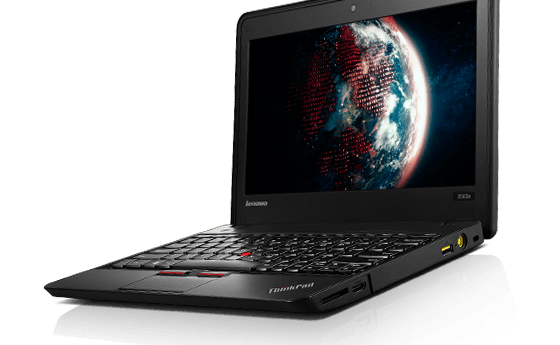
Lenovo X140e Ultrabook

On Saturday, November 26, I received a new-to-me Ultrabook.  I subscribe to e-mails from Discount Electronics and they were offering this ~ $900 PC for $144 plus S/H.  Since it was an “Ultrabook” I jumped on it.  I already own an HP’s 3105mHP 3105m Netbook.  This new machine is lighter and faster.

But there is one catch.  It is shipping with Windows 8.1.  Most of you who have suffered through the transition from Windows 7 to Windows 8 to 8.1 to Windows 10, remember the “Metro” interface and how the “workflow” so to speak of Windows 8.1 was significantly different from Windows 7.  Ouch.

I gritted my teeth and found a Youtube tutorial video on how to get around in Windows 8.1. I wasn’t impressed.  So I googled (everyone’s friend 🙂 something like “how to make windows 8.1 look like windows 7.”  Ask and you shall receive.  I found this page and downloaded the classic shell.  After installing it and clicking on a couple of choices about how I wanted my Ultrabook to look like as a Windows 7 machine I had it back.  The workflow, the menus, (I kept the new file manager though) and every other thing I was used to.

So I am happy as a clam (gorilla? chimpanzee?) Whatever.  🙂

Tlm


RISC vs. Intel cpus in the Chromebook world

One of the original main advantages of a RISC (Reduced Instruction Set Computer) was that it used less power than a CISC (Complex Instruction Set Computer).  The Intel cpu that is at the heart of most Windows and newer Mac’s is a CISC.

When the Chromebook first came out and began to sell like hot cakes some vendors were taking advantage of the RISC cpu/motherboard to sell systems with longer battery times and lower costs than the Intel/AMD-based cpus.

Intel has been designing lower power draining cpus/motherboards for laptops for years.  They apparently got busy and created something for the Chromebook line(s).  That is why you have Intel-based Chromebooks with 10+ hour battery times and lower costs than the RISC-based systems.

Tom M

Turn your older laptop or desktop into a Chromebook clone

Recently I received great news.  “CloudReady has a Chrome OS platform ready for your non-chromebook hardware”  If that link to the article on Tech Republic doesn’t work, here is the website.  You are probably interested in an individual copy of the Chromebook clone product.  It is free for individual use.

If you have an Intel PC hardware platform (usually a windows laptop) that is 8 years old or younger that you would like to run a fast, robust operating system on but it isn’t up to running say  Windows 7, Windows 8.1 or Windows 10, then this is a turnkey solution.  I have successfully installed it on 2 out of 3 laptops and a desktop I tried.  It failed on a non-standard old SSD netbook.  They have a list of tested hardware that is quite extensive on the website.

The User Interface is exactly like my ASUS Chromebook.  You will experience the Chromebook exactly except for two things.  1) If you are used to the 7 second boot time for many Chromebooks, you won’t get that.  It will boot exactly as fast as a Linux distribution would on the same hardware (around 30 seconds on mine).  2) The hardware-based security features are mostly not present.   For most people, School districts or Companies neither of the above will be deal breakers.

You will need a 8 GB Flash drive to install the Chromebook clone OS from.  The native setup only supports standalone booting and UEFI “dual booting”.  If you choose, standalone booting, all the previous information on the hard disk is deleted during the install.  With UEFI “dual booting” the previous operating system remains and is also bootable.  You will need either a fairly fast internet connection or quite abit of patience to download the operating system.

If you have a Chromebook or a Chrome browser and sign in with a Google id, CloudReady will download/clone all your extensions, applications and allow you to access your Google Drive-based data on your “new” cloned Chromebook.

Because I have an ultra-thin Chromebook I have not been motivated to move over and use this product full time.  I have one very slow (1 GHz) sub-notebook that “barely” runs Windows 10.  I may turn it into a CloudReady notebook again.  I have turned a Dell Optiplex 760 (desktop) into a Chromebook.

If you have been wanting to experiment with a Chromebook or have wanted a Chromebook but couldn’t afford a couple hundred bucks for a new/used on on E-Bay this is your path.  Educational and Commercial licenses and support are available.

If you are a school with obsolete laptops available this is an excellent, very low-cost way to repurpose them into Chromebooks.  Both Educational and Commercial licenses and support are available.

Any questions?  Post a comment.

Thanks.
Tom M

The Chromebook as a thin client

A thin client refers to a client/server system where almost all of the processing is being performed by the Server and the client simply enters the data and displays the data.  The most common example of this is the Web browser. Adobe is now offering services where they are running the high-end graphics programs on their servers and the Chromebook is running the display/keyboard/mouse pad.

Until Html5 came in and has been fully supported, while you some local processing via Javascript and Java they were still limited in what they could without plugins.  Html5 gets rid of most of the plugins (like Flash) and can still display videos and play audio files.  Html5 also supports more local processing and keeping data on the local machine.

Asus c300M

I got this one used (after a month) on e-bay for about $174.  It is basically new.  It has a 14″ screen compared to the Samsung 3’s 11″ screen.  It is running an Intel cpu and chip set.  And it has a typical run time of 10+ hours before you have to charge it up.

So this Asus c300m is probably what I will stay with.  Its funny though, Intel has gotten busy and designed cpus/motherboard chip sets with excellent low power usage.  So for the moment Intel is handily beating the ARM folks at the low power usage game.